

9 Best WordPress Hosting Compared (Aug 2025)
Finding the best WordPress hosting can be a painful process. Finding a solution that will do justice to your content, offer rock-solid reliability and hopefully not break the bank is a task that requires lots of research.
The good news is, now that you’re here, you don’t have to do any of that research. Because we did all the work for you by testing the best WordPress hosting platform available today.
In this article we feature some of the best WordPress hosting companies out there:
- InMotion Hosting: Affordable hosting with good performance for the price
- WP Engine: Fast and reliable hosting with excellent performance
- Kinsta: Fast and reliable hosting with great features and beginner-friendly dashboard
- Nexcess: Good value managed WordPress hosting with stellar performance
- Flywheel: Managed WordPress hosting with special features for freelancers/agencies building client sites
- Bluehost: Beginner-friendly, affordable hosting with unlimited space and bandwidth
- A2 Hosting: Another affordable option with unlimited resources
- DreamHost: Affordable option for cheap month-to-month billing
- HostGator: Cloud hosting with unlimited storage
We went ahead and created an account with each and every one of these platforms. We set up a test website and ran some tests to see which one offers the best performance.
Keep reading to find our results.
Quick Summary
In a hurry? Here’s a quick summary table of our top picks for budget hosting and premium managed WordPress hosting.
Our findings reveal that InMotion Hosting (for budget hosting) and WP Engine or Kinsta (for managed WordPress Hosting) are the clear winners for WordPress users.
1. InMotion Hosting offers excellent performance for a surprisingly low price. Starting at just $6.99 per month, you can get stellar managed WordPress hosting that was able to hold up under our load test, which caused most of the other cheap hosts to slow down. Beyond that, you also get useful features like staging sites, free SSL certificates, automatic backups, and more.
2. WP Engine is one of the most expensive WordPress hosting providers on the market, but its quality more than makes up for the high cost. This WordPress-centric web host is especially well-suited to rapidly growing sites. In addition, they offer enterprise-grade security features, albeit at a cost of disallowing a few popular plugins due to security vulnerabilities. You can get started with their cheapest plan, then upgrade as necessary.
3. Kinsta is also another solid option in the premium WordPress hosting space that put up near-identical numbers to WP Engine. In addition to similar performance, Kinsta also has an identical starting price to WP Engine. Honestly, at this price point, both WP Engine and Kinsta are top-notch options and you won’t go wrong with either.
What Is Managed And Shared WordPress Hosting?
While going through the article, you’ll come across terms like managed WordPress hosting, shared hosting, and cloud hosting. There are a few differences between these options.
A managed WordPress hosting plan includes lots of benefits for building WordPress websites. Such as hosting on servers optimized for WordPress software with high-tech caching systems. Automatic WordPress software updates and daily website backups. And much more. Basically, managed WordPress hosting offers faster and more reliable hosting features.
Shared WordPress hosting plans are much cheaper compared to managed hosting. However, they don’t offer the same benefits of managed hosting plans. When you use a shared hosting plan to host a website, your website usually gets stuffed on a server full of hundreds of other shared websites. This, of course, means slower website performance.
Overall, it’s best to use a managed WordPress hosting plan if you have big plans for your website. Or you can start with a shared plan and upgrade to a managed plan later, depending on the hosting platform you choose.
What To Look For In A Hosting Provider
We’ll kick things off here with a look at features that should simply be non-negotiable in any solid WordPress hosting setup.
(If you’d rather cut straight to the chase and dive into our WordPress hosting comparison, go for it!)
- Speed: Web users are notoriously impatient so speed is vital. Google is also cracking down on slow sites so you really can’t afford to be slack in this area. This is especially the case when it comes to WordPress hosting. Left unoptimized, WordPress can be a resource-heavy application so you need top-notch hardware in place to get the most bang for your buck.
- Useful features: This isn’t specific to WordPress hosting of course, but look for useful features like free SSL certificates, staging sites, automatic backups, etc..
- Security: Nothing ruins a day quicker than discovering your site has been pawned by script kiddies. Your host should have verifiably secure systems in place to deter common attacks.
- Support: Excellent support is essential in a hosting provider. You should be able to reach friendly and knowledgeable support people at any hour of the day or night. Waiting around on email tickets isn’t good enough if there’s a real problem.
- WordPress-friendly hosting: WordPress has its own specific requirements and peculiarities and not every host is set up to handle it optimally. Right now, WordPress ideally needs to be running on PHP 7.3 (or greater) and MySQL 5.6 (or greater) to avoid security vulnerabilities and potentially broken features. Look for a host with a strong track record in dealing with WordPress sites.
- Pricing and value for money: It’s all very well having a super-fast, super-secure server, and an awesome site, but if you’re spending ten times as much on it as you can ever hope to get back, all that effort is in vain.
Best WordPress Hosting Providers to Choose From
Let’s quickly talk about how we tested these hosts. Then, we’ll share more detail on all nine hosts that we put through the paces.
How We Tested Hosting Platforms
Unlike many other hosting guides that are biased in favor of one particular provider from the get-go, we’ve reviewed each of the hosts totally independently. One of our key focuses is performance, as how quickly a host can load your websites is one of the most important factors in choosing a host.
To assess performance, we used two different tools:
- WebPageTest – this lets us run a one-off test to collect important metrics like Largest Contentful Paint, Fully Loaded time, and Time to First Byte (TTFB). We used a throttled FIOS connection to get more realistic load times, which will naturally lead to slightly “slower” load times than a tool like Pingdom that uses an ultra-fast unthrottled connection. These loads times are more relevant to what your site’s actual human visitors will experience, though.
- Load Focus – this lets us see how a host holds up under a high-traffic scenario. We hit the hosts with 20 visitors in a 60 second period, which is a fairly difficult test and more traffic than most sites receive. You’ll see that the more expensive hosts handled this test with ease, while a lot of the budget hosts experienced slow-downs in comparison to the one-off tests.
We used an identical test site for all the hosts. To create a realistic test scenario (rather than just testing a blank site), we created our test site using the Astra theme and its block editor-powered Sierra Industry demo site, which includes common plugins like a form plugin.
Now, let’s get to the hosts!

1. InMotion Hosting (www.InMotionHosting.com)
- Starting Price: $6.99 per month
- Website Loading Speed: 759 ms
- Best Feature: Affordable pricing
- Our Hands-On Review
InMotion Hosting is one of the biggest names in hosting. Their WordPress plans are particularly attractive due to budget-friendly prices.
Their prices are a lot lower than premium managed WordPress hosts, but InMotion Hosting still manages to offer surprisingly good performance for their low prices. The performance isn’t quite as good as pricier options like WP Engine or Kinsta, but it does offer very good value for the money.
Their cheapest plan comes in at a surprisingly low $6.99 per month. For the features they offer, that’s one of the best prices around.
Main Benefits of InMotion Hosting
- SSD and Nginx: Powered with SSD storage and Nginx, InMotion offers faster website load times for websites.
- Automatic updates: InMotion offers automatic updates for both WordPress system and plugins.
- Free backups: Your website will get backed up automatically, every day.
- Free SSL, CDN, and Domain: You get a free domain name, SSL, and CDN integration with all accounts.
- Staging sites: You can use staging sites to safely test changes to your site(s).
- Unlimited email hosting: Host unlimited custom email accounts at no extra cost.
How Fast is InMotion Hosting?
- Largest Contentful Paint: 0.518 s
- Fully Loaded Time: 0.759 s
- Time to First Byte (TTFB): 0.246 s
- Load Average Response: 0.435 s
InMotion Hosting performed surprisingly well in our performance tests when you consider its prices. In WebPageTest, it had excellent metrics across the board, though its TTFB could be a little bit faster.
Most surprisingly, though, it passed the Load Focus tests with flying colors. This is impressive because a lot of the other budget WordPress hosts failed in the load tests. This shows that InMotion Hosting will still be able to load your site quickly even in high-traffic scenarios.
InMotion Hosting Pricing
- WP-1000S: $6.99 /mo for hosting 1 website with 50 GB space
- WP-2000S: $7.99 /mo for hosting 2 websites with 100 GB space
- WP-3000S: $9.99 /mo for hosting 3 websites with 150 GB space

2. WP Engine (www.WPEngine.com)
- Price: $28 per month
- Website Loading Speed: 630 ms
- Best Feature: Top-notch performance
- Our Hands-On Review
WP Engine is the biggest name when it comes to premium managed WordPress hosting. It’s a big company, with a valuation that’s likely over a billion dollars. It offers top-notch features, performance, and support. You also get goodies that other hosts don’t offer, such as free access to the Genesis Framework and all 30+ StudioPress child themes.
Overall, if you want top-notch WordPress hosting and you’re willing to pay for it, WP Engine is a great option.
WP Engine offer a number of standard packages split out by traffic, storage, and the number of sites that you can host. These range in price from $30 to $290 per month, with discounts if you pay annually. For our tests, we ran on the entry-level StartUp package.
Main Benefits of WP Engine Hosting
- EverCache: This in-house built caching technology help speed up your website performance with Varnish and Memcached.
- Free exclusive themes: With WP Engine you get access to a collection of over 30 exclusive themes built using Genesis framework.
- Automatic updates and backups: WP Engine provides automatic WordPress system updates and daily backups.
- Free SSL and CDN: You also get free HTTPS and CDN for your website.
- Staging sites – easily test changes using a built-in staging site.
How Fast is WP Engine Hosting?
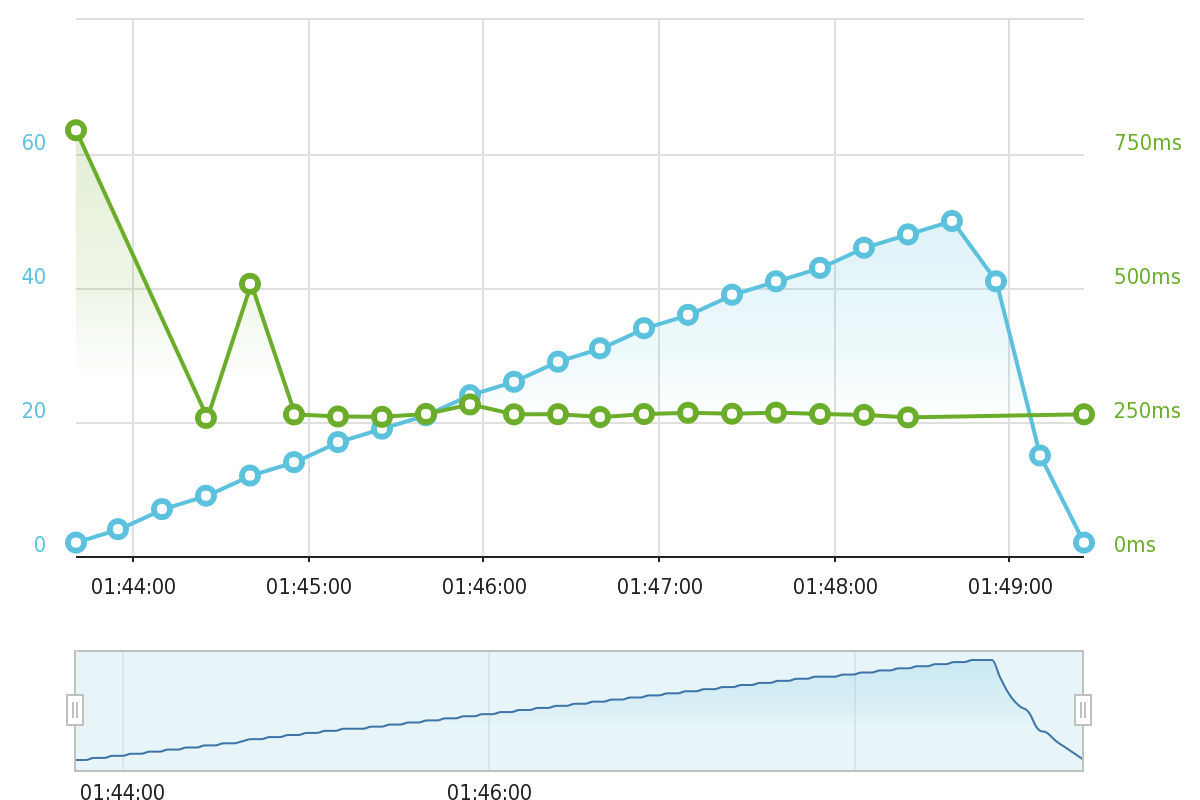
- Largest Contentful Paint: 0.556 s
- Fully Loaded Time: 0.630 s
- Time to First Byte (TTFB): 0.123
- Load Focus Average Response: 0.249 s
As you’d expect from a host at this price level, WP Engine nailed all of our performance tests, including the load testing from Load Focus.
Basically, if you pay the premium for WP Engine, you’re going to get your money’s worth when it comes to performance.
WP Engine Pricing
- Startup: $30 /mo for hosting 1 website with 10 GB space and 25,000 visits.
- Professional: $59 /mo for hosting 3 websites with 15 GB space and 75,000 visits.
- Growth: $115 /mo for hosting 10 websites with 20 GB space and 100,000 visits.
- Scale: $290 /mo for hosting 30 websites with 50 GB space and 400,000 visits.

3. Kinsta (www.Kinsta.com)
- Price: $30 per month
- Website Loading Speed: 569 ms
- Best Feature: Top-notch performance
- Our Hands-On Review
Kinsta is one of the rising stars in the managed WordPress hosting industry. It offers a range of services for all sizes of websites at an unmatched price range.
Even though Kinsta is a fairly new contender to the industry, it’s already being recognized as a solid hosting provider. And is trusted by major brands such as Ubisoft, Ricoh, and more.
Their pricing starts at $30 per month for hosting one website and goes all the way up to $1500 a month for hosting 150 websites.
Main Benefits of Kinsta Hosting
- WordPress-optimized architecture: Kinsta uses state-of-the-art technology such as Nginx to provide faster performance to hosted websites.
- Automatic scaling: Kinsta also uses automatic scaling to keep your site live during traffic spikes.
- Hack fix and backups: In addition to full security protection, Kinsta also offers to fix your website in case of a hack. And provide daily backups as well.
- User-friendly dashboard: Kinsta has a beginner-friendly dashboard for managing all your websites in one place.
How Fast is Kinsta Hosting?
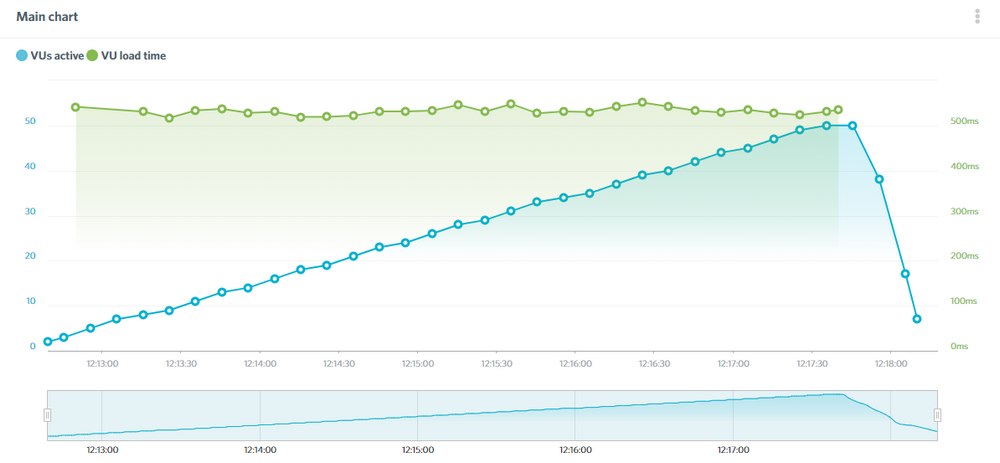
- Largest Contentful Paint: 0.506 s
- Fully Loaded Time: 0.569 s
- Time to First Byte (TTFB): 0.122 s
- Load Focus Average Response: 0.474 s
Like WP Engine, Kinsta put up excellent performance results to justify its higher price tag. Especially in the load test, you can really see where you get your money’s worth when it comes to WordPress hosting.
Whether you have a low-traffic or a high-traffic site, you should be very happy with the performance that Kinsta provides.
Kinsta Pricing
- Starter: $30 /mo for hosting 1 website with 10 GB space and 25,000 visits.
- Pro: $60 /mo for hosting 2 websites with 20 GB space and 50,000 visits.
- Business 1: $100 /mo for hosting 5 websites with 30 GB space and 100,000 visits.
- Business 2: $200 /mo for hosting 10 websites with 40 GB space and 250,000 websites.
- …additional plans – Kinsta offers ten different plans in total.

4. Nexcess (www.Nexcess.net)
- Price: $19+ per month
- Fully Loaded Time: 955 ms
- Best Feature: Great performance for the price
- Our Hands-On Review
Nexcess is the brand that Liquid Web uses for its managed plans. If you’re not familiar with Liquid Web, it’s a popular and well-respected hosting company.
Nexcess offers managed plans for both general WordPress sites and also special managed plans for WooCommerce stores (complete with a lot of unique options)
Overall, Nexcess had some of the best performance in our tests, but it’s plans are still quite affordable starting at just $13 per month for managed WordPress hosting.
Main Benefits of Nexcess
- Excellent performance: Nexcess had some of the best performance of any host on our list.
- No visitor limits: Unlike most managed WordPress hosts, Nexcess doesn’t place any arbitrary visitor limits on your plans – you’re only limited by storage and bandwidth.
- Safe plugin updates: Safely update your plugins on autopilot with built-in visual regression testing.
- iThemes plugins: Get access to premium iThemes plugins at no extra cost (Liquid Web/Nexcess acquired iThemes a few years ago).
- WooCommerce plans: Nexcess offers dedicated managed WooCommerce plans, which are great if you’re running a WooCommerce store.
How Fast is Nexcess?
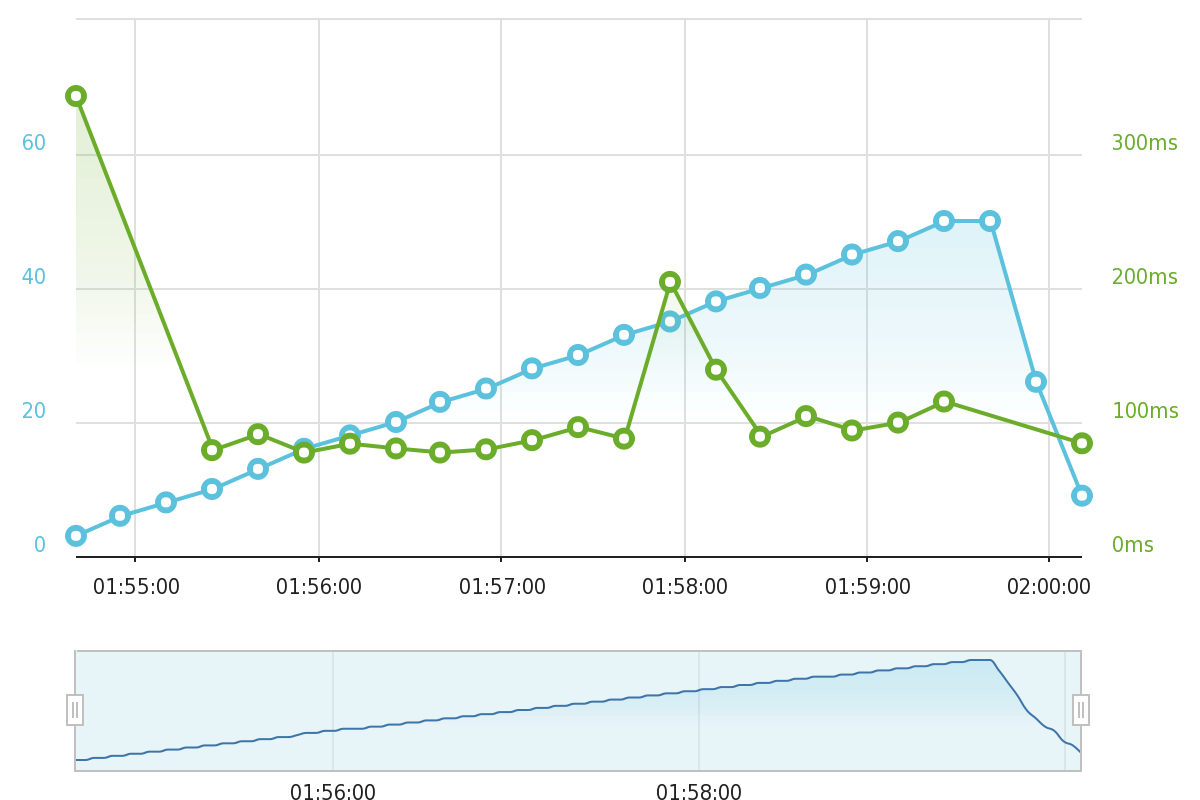
- Largest Contentful Paint: 0.554 s
- Fully Loaded Time: 0.955 s
- Time to First Byte (TTFB): 0.400
- Load Focus Average Response: 0.435 s
Overall, Nexcess had excellent results in our WebPageTest runs. The TTFB was a little higher than WP Engine and Flywheel, but the overall load times were quite impressive.
Nexcess was even more impressive in our load testing from Load Focus, where the average response time across the entire test was just 400 ms, which puts it in the same area as WP Engine and InMotion Hosting.
Nexcess Pricing
Nexcess offers seven different pricing plans, so there’s something for everyone. However, the higher-tier plans run in the hundreds of dollars, so we’ll just focus on the first four plans. You can also save some money if you pay for a year upfront.
- Spark: $19/mo for 1 website, 15 GB of storage, and 2 TB of bandwidth.
- Maker: $79/mo for 5 websites, 40 GB of storage, and 3 TB of bandwidth.
- Designer: $109/mo for 10 websites, 60 GB of storage, and 4 TB of bandwidth.
- Builder: $149/mo for 25 websites, 100 GB of storage, and 5 TB of bandwidth.

5. Flywheel (www.getflywheel.com)
- Price: $15 per month
- Website Loading Speed: 523 ms
- Best Feature: Special tools for freelancers and agencies
Flywheel is a managed WordPress host that markets itself more towards creative freelancers and agencies building client sites, though it also makes a great option to host your own sites.
If you are building client sites, though, you can take advantage of Flywheel’s Growth Suite offering, which is a really unique option in the WordPress hosting space.
Note – Flywheel was acquired by WP Engine (an earlier entrant on this list) in 2019. The two companies are still run separately for the most part. One area where they’ve homogenized, though, is pricing. Flywheel and WP Engine now have very similar pricing plans and limits, though there are still a few differences.
Main Benefits of Flywheel Hosting
- Powered by Google Cloud: With the power of the Google Cloud platform, Flywheel offers faster and reliable hosting for websites of all sizes.
- Flycache: Flywheel’s in-house caching system also optimizes websites for better performance.
- Free backups and security: Flywheel also provides free nightly backups and protection from malware and hackers.
- Free migration: Flywheel will even offer to migrate your site from another host for free.
- Tools for agencies and freelancers: If you’re building client sites, Flywheel has a lot of unique tools to make your life easier.
How Fast is Flywheel Hosting?
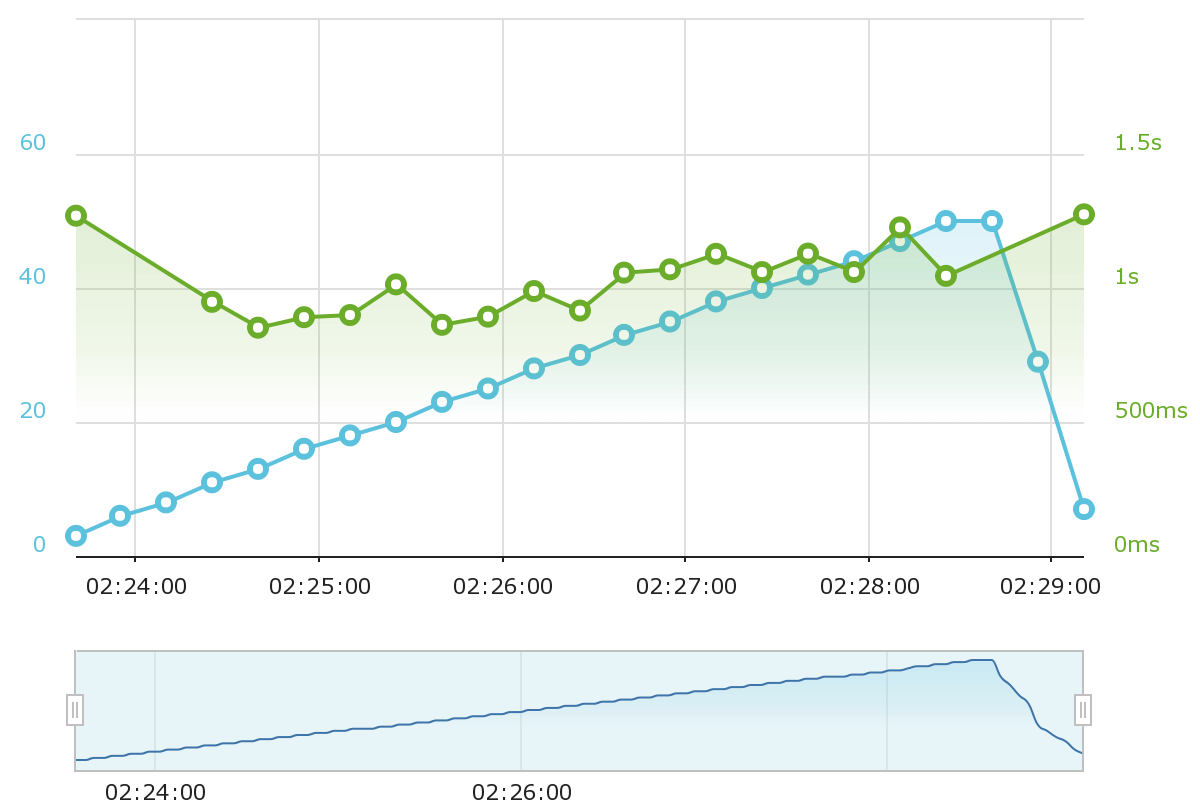
- Largest Contentful Paint: 0.458 s
- Fully Loaded Time: 0.523 s
- Time to First Byte (TTFB): 0.023 s
- Load Average Response: N/A (Flywheel’s firewall automatically blocks load testing to prevent DDoS attacks)
Unfortunately, we weren’t able to test Flywheel using Load Focus because Flywheel’s security kicked in to block our load test because load testing can look a lot like a DDoS attack. Honestly, this is a great thing from a security perspective because it shows that Flywheel is proactively protecting your site…but it does mean we can’t test Flywheel’s ability to hold up under load.
With that being said, Flywheel’s performance in the one-off WebPageTest tests was excellent and, based on experience, you can expect those same results to hold true under load just like you saw with WP Engine (Flywheel’s parent company).
Flywheel Pricing
- Tiny: $15/mo for 1 website with 5 GB storage and 5,000 visits.
- Starter: $30/mo for 1 website with 10 GB storage and 25,000 visits.
- Freelance: $115/mo for 10 websites with 20 GB storage and 100,000 visits.
- Agency: $290/mo for 30 websites with 50 GB storage and 400,000 visits.
You can get a discount if you pay for a full year upfront.

6. Bluehost (www.Bluehost.com)
- Price: $2.95 per month
- Website Loading Speed: 1,098 ms
- Best Feature: Very beginner-friendly experience
Bluehost is a beginner-friendly budget WordPress hosting option. In addition to offering unlimited resources on most of its plans, one of Bluehost’s standout features is just how user-friendly it is.
Simply put, Bluehost makes it super easy to launch a WordPress site, even including its own drag-and-drop WordPress website builder tool. Or, if you already know your way around WordPress, you can just install the regular version of WordPress.
In terms of performance, Bluehost is good enough for low-traffic sites. But for serious, high-traffic sites, you’ll probably want to invest in a host that offers better performance.
Overall, Bluehost can be great when you’re starting out, but you might need to migrate to something like WP Engine or Kinsta once your site starts growing.
Bluehost also offers its own managed WordPress hosting plans though, at those prices, you’d probably be better of just moving to WP Engine or Kinsta.
Main Benefits of Bluehost Hosting
- Unlimited everything: With Bluehost, you get unlimited space and bandwidth to make unlimited websites.
- Beginner-friendly features and interface: Bluehost builds user-friendliness into the entire experience, even offering their own custom WordPress website builder.
- Caching: Bluehost builds in caching via its companion plugin.
- Free SSL and CDN: You also get free HTTPS and CDN with all plans.
- Security: Bluehost also provides a service to detect malware and remove them from your website.
How Fast is Bluehost Hosting?
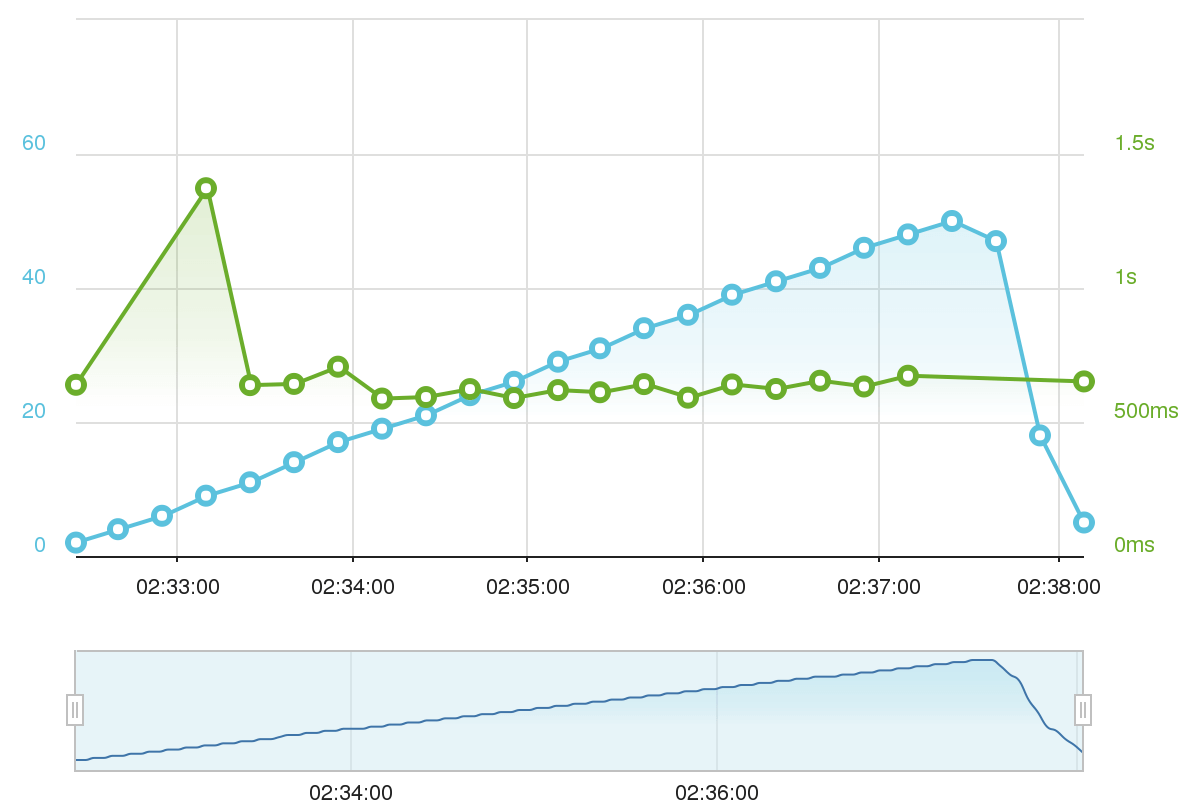
- Largest Contentful Paint: 0.949 s
- Fully Loaded Time: 1.098 s
- Time to First Byte (TTFB): 0.333 s
- Load Focus Average Response: 3.867 s
Bluehost had some interesting results in our performance tests. In our one-off WebPageTest tests, Bluehost actually did quite well, with respectable load times and TTFB. If you look at just this single test, you’d be rightfully impressed by Bluehost’s performance.
However, in the load testing, Bluehost showed some cracks, with an average response time over 3.8 seconds, which was one of the slower hosts on this list.
This suggests that Bluehost might be a solid option for simple low-traffic sites, but probably isn’t a good host for high-traffic sites because of its poor load testing results.
Bluehost Pricing
- Basic: $2.95 /mo for a single site and 50 GB storage.
- Plus: $5.95 /mo for hosting unlimited websites and unlimited storage.
- Choice Plus: $5.95 /mo for everything in plus with the addition of automatic backups
* These prices assume a three-year commitment – you’ll pay slightly more for shorter-term commitments.

7. A2 Hosting (www.A2Hosting.com)
- Price: $2.99 per month
- Website Loading Speed: 1,241 ms
- Best Feature: Affordable prices for unlimited resourceshttps://www.designbombs.com/go/a2hosting-wp
A2 Hosting is another popular shared WordPress host. With low entry-level prices, it can be a solid option for cheap WordPress hosting. Like Bluehost, they offer unlimited websites and resources on most of their plans, as well as some user-friendly features like staging sites and free SSL certificates.
On their higher-tier shared plans (called Turbo), they also offer LiteSpeed server, which will offer even better performance than the plans that we tested.
Main Benefits of A2 Hosting
- Unlimited resources: With the exception of the cheapest plan, all of A2 Hosting’s plans support unlimited resources.
- Free automatic backups: Get automatic backups on all plans except the cheapest one.
- LiteSpeed server: The Turbo plans offer LiteSpeed server, which offers much-improved performance for a still-affordable price.
- Staging sites: Use staging sites to safely test changes.
How Fast is A2 Hosting?
- Largest Contentful Paint: 1.112 s
- Fully Loaded Time: 1.241 s
- Time to First Byte (TTFB): 0.625
- Load Focus Average Response: 6.633 s
A2 Hosting’s performance looks a lot like the other cheap WordPress hosting options on this list. It performed fine in the one-off WebPageTest run, but it struggled to handle our load testing scenario from Load Focus.
Again, our Load Focus scenario is pretty difficult, so it’s a tough task for any shared host to handle. But when you look at A2 Hosting’s 6+ second average response time in Load Focus, you can really see that you get your money’s worth when using the more premium managed WordPress hosts.
A2 Hosting Pricing
A2 Hosting offers four different plans The prices below are for a three-year commitment, but you can also pay yearly or monthly for a slightly higher rate.
- Startup: $2.99/mo for 1 website and 100 GB storage.
- Drive: $4.99/mo for unlimited websites and unlimited storage.
- Turbo Boost: $9.99/mo for unlimited websites, unlimited storage, and LiteSpeed Server.
- Turbo Max: $14.99/mo for unlimited websites, unlimited storage, LiteSpeed Server, and 5X resources.

8. DreamHost (www.DreamHost.com)
- Price: $14.95 per month
- Website Loading Speed: 1,335 ms
- Best Feature: Affordable shared hosting price with cheap month-to-month billing
DreamHost offers multiple WordPress hosting plans, including cheap shared hosting and an affordable managed WordPress hosting product called DreamPress.
For our testing, we looked at the shared plan, which is one of the better budget options. A standout of the shared plan is that it offers affordable month-to-month billing, whereas most other shared hosts will force you to pay for at least a year upfront (or charge a really high monthly price).
Main Benefits of DreamHost Hosting
- Month-to-month billing: Pay for one year at a time rather than a full year upfront.
- Custom hosting dashboard: DreamHost built its own custom dashboard to help you manage your hosting.
- Built-in caching: This ensures fast performance and helps your server stand up under load.
- Automatic backups: DreamHost automatically backs up your site’s data to keep it safe.
How Fast is DreamHost Hosting?
- Largest Contentful Paint: 1.187
- Fully Loaded Time: 1.335
- Time to First Byte (TTFB): 0.658
- Load Average Response: 1.981 s
In the one-off WebPageTest, DreamHost did pretty well for being shared hosting. It’s similar to Bluehost and A2 Hosting, which is what you’d expect at this price range.
For being cheap shared hosting, DreamHost did fairly well in the load test. It didn’t perform anywhere close to WP Engine or Kinsta, but it did beat out a lot of the similarly-priced shared hosts such as Bluehost and A2 Hosting.
DreamHost Pricing
- WordPress Starter: $4.95 per month (month-to-month) for one website and unlimited traffic.
- WordPress Unlimited: $8.95 per month (month-to-month) for unlimited websites and unlimited traffic.

9. Hostgator Cloud (www.HostGator.com)
- Price: $5.95 per month
- Website Loading Speed: 2,072 ms
- Best Feature: Affordable cloud WordPress hosting option
HostGator is a renowned name in the web hosting world, but not a beloved one. Lots of experienced users tend to look down on their hosting plans, but they’ve now come out swinging with a strong offering for WordPress users – their WordPress Cloud Hosting plans.
Their basic plan obtained decent results during our tests (more of which later), and they start at a reasonable $5.95 per month, going up to $9.95 per month.
Main Benefits of Hostgator Hosting
- Cloud hosting: Hostgator boasts 2.5X faster load times thanks to its cloud architecture and low-density servers.
- Unlimited storage: You also get unmetered storage space with all plans.
- Free migration: Hostgator offers free migration services for moving your site from a different host.
- Free CDN and SSL: You can optimize your site for better protection using free SSL and CDN as well.
How Fast is Hostgator Hosting?
- Largest Contentful Paint: 1.251 s
- Fully Loaded Time: 2.072 s
- Time to First Byte (TTFB): 0.506
- Load Average Response: 4.220 s
HostGator’s test results look a lot like similarly-priced hosts such as Bluehost and A2 Hosting. You can see that, in the one-off WebPageTest runs, HostGator had quite respectable load times, though its TTFB was a little bit higher than you’d like.
However, things aren’t quite so smooth when the heat is on, and you can see HostGator struggle in the load tests with an average response time over 4 seconds.
Overall, this indicates that HostGator can be a good budget option for low-traffic sites, but it’s probably not the best spot for important high-traffic sites.
Hostgator Pricing
- Starter: $5.95 /mo for hosting 1 website with unlimited space, 1 GB backups, and 100,000 visits.
- Standard: $7.95 /mo for hosting 2 websites with unlimited space, 2 GB backups, and 200,000 visits.
- Business: $9.95 /mo for hosting 3 websites with unlimited space, 3 GB backups, and 500,000 visits.
Overall Hosting Platform Comparison
We’ve summarized the results of our tests in the following table with leading results highlighted in green and lower-ranking results in red.
| Web Hosting | Starting Price | Fully Loaded Time | SSL | Email Hosting | Free Domain |
|---|---|---|---|---|---|
| 1. InMotion Hosting | $6.99/mo | 759 ms | ✓ | ✓ | ✓ |
| 2. WP Engine | $30/mo | 630 ms | ✓ | X | X |
| 3. Kinsta | $30/mo | 569 ms | ✓ | X | X |
| 4. Nexcess | $19/mo | 955 ms | ✓ | ✓ | X |
| 5. Flywheel | $15/mo | 523 ms | ✓ | X | X |
| 6. Bluehost | $2.75/mo | 1,098 ms | ✓ | ✓ | ✓ |
| 7. A2 Hosting | $2.99/mo | 1,241 ms | ✓ | ✓ | ✓ |
| 8. DreamHost | $4.95 | 1.335 ms | ✓ | ✓ | ✓ |
| 9. HostGator | $5.95/mo | 2,072 ms | ✓ | ✓ | X |
Which Hosting Platform Is Best?
Choosing the best WordPress hosting is tricky because a lot of it comes down to your own unique situation.
If you asked us to pick the absolute best hosting without thinking about price, it would be WP Engine (use our 20% off coupon) or Kinsta. These two hosts had the best performance, have the best features, have top-notch support, etc.
However, most of us can’t afford to ignore price, and you might be motivated by something else.
With that in mind, we think InMotion Hosting is a great budget option for most people. Is it as fast as WP Engine or Kinsta? No it isn’t…but it is still pretty fast and less than one-third of the price of those two hosts. So if money is tight, definitely give it a look.
Or, Nexcess is another option that offers managed features and top-notch performance at a more accessible price than WP Engine or Kinsta.
On the other hand, while we think performance is king, it might not be what you value most in a host. If you’re a total beginner just building a hobby website, you might value affordability and beginner-friendliness above performance. In that case, Bluehost might be the best option for you. Are they the fastest host? Definitely not. But Bluehost did have respectable load times in the one-off test and Bluehost stands out for its user-friendly experience.
WordPress Hosting: Frequently Asked Questions (FAQs)
The followings are some of the most common questions and answers that’ll help you understand WordPress hosting a little bit better.
The WordPress software itself is completely free to download and use. Make sure that you download it from wordpress.org website. When using a WordPress hosting provider, you can install it directly from your hosting account dashboard. It only takes a single mouse click.
Yes. Even though WordPress software is free to use, you need to install the software on a server to set up your website using the software. And to make your website accessible to everyone on the Internet. There are many different types of hosting you can use to set up a WordPress website at different price ranges.
Unless you set up a website with WordPress.com, which puts lots of restrictions and limitations, you won’t find free hosting to make a professional WordPress website. Even if you come across any free hosting sites, avoid them. Because they will only offer slow hosting and fill your website with advertisements.
Managed WordPress web hosting platforms offer free daily backups of your website. However, it’s always a good idea to have an alternate option. You can use a free plugin to set up an automatic backup system for your website. Follow this guide to pick the right plugin for the job.
Yes. Using third-party plugins such as WPML and Polylang you can easily add multilingual support to your website. And offer translations in dozens of languages.
The main difference between WordPress hosting and shared hosting is that WordPress hosting includes servers that are specially optimized to boost the functionality of WordPress software. They also include special caching systems to speed up your websites. Shared hosting, on the other hand, doesn’t provide any special features but offers affordable pricing.
This is a complicated process that involves multiple steps and it can also differ depending on the type of hosting you use. It’s best to contact your web hosting provider and ask for their help. Most WordPress web hosting providers will even offer to move your site for free.
If your host doesn’t offer free migrations, you can use a WordPress migration plugin like Duplicator.
If you started a blog on WordPress.com and want to transform it to a self-hosted blog, you can do so by transferring all your data to a new hosting account. Follow this guide to learn how it’s done.
I think one more point to consider would be whether the host would do all the initial wordpress installations. This changes the whole equation as a user need not bother about the hard stuff (installing the blog, setting up email ids etc).
I agree with some of what you said. I believe the only real WordPress host or whoso would ever recommend to a friend if they said you know of any good WordPress hosts? would be WP engine I am hosting my site right now it’s lightning fast on it outstanding support and if you’re paying $50 or more for a host as you are with host gator you should clearly look at how little $50 extra dollars a month is for your business and put it on the pro plan on WP engine if you can’t stomach paying that use Zippy kid you get very similar hosting to WP engine a content delivery network and 100,000 viewers a month for $24 And $5 more a month for every additional hundred thousand unique visitors. Now if you want VPS WebSynthesis is the only way to go for real WordPress hosting with a VPS for only $25 a month now please remember there’s no reason you need a VPS if you’re using managed WordPress host. Last but not least I would recommend page.ly they are able to offer quite a bit and those are the only hosts I would ever recommend to my friend if they asked me about WordPress. Your girlfriends website gets half 1 million hits a month and you put her on nickel and dime hosting why? Does this site not generate enough money to have a decent host I find that hard to believe if it’s really getting half million hits a month.
I forgot to tell you one thing host gator has been accused and rightfully so please Google this “host gator found putting links customers websites” I am not going to say they do or they don’t I’m just saying apparently a lot of people on Google believe that they do.
@Thomas Zickell: Thanks for the input. And to my girlfriend’s site – a few months ago I did go ahead and move her site over from Dreamhost to WP Engine and have been happy with the change.
Hi, thank you so much for this post, I’m trying to find a good host for my WordPress blog and I didn’t know what other hosts are out there besides Dreamhost. Thanks for the info!
I’ve used dreamhost and wpengine. I’ve been using liquidio.net recently, so far it’s solid. Really just stay away from hostgator and you’ll be fine lol.
Why are some WordPress Hosting so expensive?
Is there really such a difference between something like Websynthesis.com ($47) Pagely.com (24$) or WpEngine (29$) and something like MyWoHo.com (1$) or Bluehost.com (3.5$)?
Or is the reason why most blogs list only companies like websynthesis, pagely or wpengine the fact that this companies earn 30-40 times what others earn and that they can spend this money in advertising?
I doubt there is any difference, probably a little more optimizing here and there, but not worth the cost.
Dreamhost doesnt backup. I am moving all my sites. Unbelievable a host that doesn’t BACKUP
ipage.com is the best!
I had Media Temple.
After a DDOS attack and how they couldn’t helped me I moved to DreamHost.
But my WordPress malfunctioned after the move, so now DreamHost can’t help me.
Another alternative is BlogDroid. Like WP Engine, they offer managed hosting but they are a little cheaper – and like Dreamhost they have an installer that makes it really easy for new WordPress users to get started. They also have automatic WordPress upgrades, the ability to create staging sites via a button and secure file permissions that work right out of the box.
Good, information, but still I am confused about the best host, Dreamhost is Good, when I have hosted my sites on Dreamhost, rank of my websites in Google was really nice but when I moved to Hostgator, it fall badly… I need something like hetzner.
I think the only reason that companies like Host Gator get put in these best WordPress or best Drupal (and so and so on) articles is just because they are an easy choice. WP Engine definitely has a great reputation and every one I know that uses them has been generally happy. My workplace uses Nexcess.net and we have had only good things to say about them. The support staff is knowledgeable and always quick to respond. They’re definitely worth a look.
I’m always suspicious of comments that drop a reference to some no-name hosting company at the end of the comment since in my experience a majority of them are someone from that same company astroturfing.
Thank your for this post. It is just unbelievably FRUSTRATING trying to find information on hosts for WordPress. Currently I’m with Hawk Host, which was recommended to me, but service there is by email only and spotty at best. If WP Engine really delivers on the promised security and expertise, it would be worth paying for.
Good information on comparing these hosts. I had my wordpress site hosted on shared with Hostgator, however after a while I moved it to VPS, but my site kept crashing. I did alot of research and after moving through various host, I finally host with webnet hosting. They provide quick support and also their server speed is pretty fast, I am quiet happy so far
Wpengine is not bad, but its costly. BlueHost is my favourite one. Thanks for honest reviews.
Bluehost doubled their prices and their support is crap. They used to have great support, if they had a sale and you talk to them they would the changes you requested to match their sale. Now, they got ought by EIG which own almost all hosting companies out there and they moved their support to India and they could care less about pleasing the client, they do not have the same “the customer is always right attitude”. They doubled their prices and refused to make any changes to match the $6 a month for new accounts, so I told them: Thank you, I am going to start looking for a new hosting company… and they could not care less. So I went with hawkhost and now I am paying $2.24 a month.
WP ENGINE is really bad, often down and under attack. your site will be down often
I have been to Hostgator, Media Temple, and several other shared hosting, even Synthesis. But nothing beats WP Engine in terms of performance, security as well as price. I haven’t tried Dreamhost though so I can’t comment on their services.
I just moved from a shared server to HostGator VPS (Level III) and have nothing but trouble so far. The site is 10x slower than it was on our developer’s shared server and we keep having to put out fires (figuratively), with things not working at all on our site.
I have to agree with the article. Cost should not be the primary factor when one is looking for the best wordpress hosting. However there are a plethora of web hosts out there who offer great wordpress hosting for a very competitive price. One thing to consider is page load times for the host. Any reputable host should be able to give you some examples of sites they have on shared hosting. Then you can use something like pingdom tools to test the load times and go with the host that has the fastest load times and reliable support/hardware/network.
I’ve been using Hostgator since a year and hosted many of my sites there! Their customer service is pretty good! I only faced couple of downtimes when their Provo servers had outrage. . . apart from that, I’m very satisfied with performance. . .
As a web design, I can say that WP Engine is the best for WordPress. If your a web business with lots of traffic WP Engine is a good investment , however I find Hostgator more that acceptable for most small to mid-size website, especially if you add cloudflare or a cache plugin. Hostgator also has really good support. I can hop on a chat or call and be communicating in usually 1-2 minutes, practically zero down-time. I can name several times where a website will be down and a client calls and by the time I check the website is back up.
From experience with multiple clients, I can say Godaddy Hosting is not great for WordPress, even small websites it not that good. I also don’t like that they don’t use cPanel.
Thanks for your comment. I use Host Gator and discovered my sites were down. They told me it had to do with my cache and that I needed to clear it. This never happened to me before and I can’t assume the visitors to my website will know they will need to do this. They’ll just leave and never come back. Hostgator said to to prevent this from happening, paste this to your domain .htaccess:
ExpiresActive On
ExpiresDefault A1
Header append Cache-Control must-revalidate
Does that sound right to you?
Used to be a big fan of wpengine … but it looks like as they gain in popularity the service and attention to detail has gone out the window.
I am on their 10 site plan ( $249/month gulp ) and I can’t get a ticket resolved on the weekend ?!? and when it gets finally answered it’s always the guy that just came back from vacation and I have to explain everything all over again.
Just cancelled my plan with them .. I am sure for the same monthly investment I can get someone that replies on the weekend as well 🙂
Yeah, I haven’t been super impressed recently either unfortunately. Just moved a big site away from them.
Which host are you on? We’re pleased with WPEngine, but been getting 502 timeouts due to the amount of WooCommerce extensions we have. We are basically running 90 odd plugins at all times, and this causes 502 errors when we try updating the site. Add to the fact that we might soon be hitting 25k of unique visitors, we might need to look for a new host.
I’ve spoken to those awesome guys from WPE, but their ping timeout is 60 secs max. No adjustments possible 🙁 sigh. Any idea on where to host and not get 502 ping timeout?
I’m very happy with ASmallOrange so I’d try them. However your situation sounds like you need expert help with your setup instead of throwing more resources at it. It might be worth getting a company like WP Valet or similar to go through your code/plugins and do a site audit.
Excellent comparison and perfect timing as I’m in the middle of choosing a new hosting company.
Great work.
Glad you found it useful, Michael. Thanks for the comment.
One thing I recommend is do your research on how easy it is to work with the host. I started a website back in 2009 (not using a host on this list). The price was good but the backend was terrible. I had them install WordPress, so I didn’t have to deal with their backend enough to care. Then I wanted to add another website to my hosting plan. It was a pain trying to figure out how to create a folder for the domain. I finally got it. A few months later I wanted to add another one. I had to go through the process all over again because it wasn’t intuitive enough for me to remember how to add the folder. I now have 6 sites on that plan. I’ve noticed some loading issues. I’ve also noticed that I can’t install some plugins because they require a higher version of PHP than what’s on my hosting plan. I asked them about this and they said I need to move to a newer server.
Buying the plan for the new server wasn’t even intuitive. I ended up getting the wrong thing and finally had to contact them. I now have two hosting plans (one is an old Linux server and the new one is c-panel). Now I’m trying to move all of my sites to the new plan. I still don’t have it done. I had issues and now everything is back to the original plan. After a few months of trying I’m tempted to just move to a new host entirely. Thanks for this detailed overview. I might just go with one of these hosts. They all look better than the one I’m currently with.
Hi Randy!
I’m sorry to hear you’ve been having such an unpleasant experience. I’ve had some bad experiences myself, so I understand the importance of having something you can just “set and forget”. If you do decide to move to a new host, I wish you a smooth transition.
Cheers,
Tom
How is inmotion? Has anyone taken a look at them and their hosting?
Cheers
E
Hi Eric,
InMotion looks like a great hosting company — we’re working on a review / roundup post, should be up in next few weeks.
Want me to give you an heads up, when it goes live?
Is your review of InMotion up?! I’m considering using them and their reseller tools but am wanting to do some research before moving from Bluehost.
It should be up by the end of next week.
Hey Kenny, we finally did the review — http://www.designbombs.com/inmotion-hosting-review/
Fantastic! I’ll check it out! Thank you!
I’ve had a very bad experience with Bluehost. First of all Downtimes! I opened a ticket and for a few days nobody answered me. Didn’t like Bluehost at all and don’t recommend it.
Hi Mark,
I’m sorry to hear that. I trust they were able to solve your issue, though?
Cheers,
Tom
well actually there were too many problems with them. i did some researh and chose another company. user reviews were really helpful.
I see. Well, at least your problems are now solved — and yes, user reviews can be very helpful when searching for the best solution (providers, products, etc).
I have been a Bluehost Client over year’s but I left because Bluehost don’t know what is happening with your account, I had 45 account’s with you and also a Reseller account ( that you close). I think that they have so many clients that they don’t seem to care about losing you.
Very sad about the bluehost experience. I moved my accounts to another company and they don’t even care. The service was slow, recently they got problems (like their where hacked) and I lost all the information in two site, when I called they said “Buy a backup plan” but they have a guarantee of 99.99% availability on their service.
So if you don’t want to wait 30 minutes for a Chat to Technical support and downtimes all time, do not use Bluehost. Very bad experience.
I came upon this site for one reason and one reason only – that I am DESPERATE to leave Bluehost. Over the last two weeks my sites have been down (COMPLETELY down – I can’t access the editor at all and people receive an error message when trying to visit them) about a dozen times that I’ve come across, sometimes for hours at a time. At other times they’ve been so slow that tiny little changes – adding a page to the menu, changing the order of pages in the menu – take minutes, and a page with nothing but a couple thousand words of text and one 200 kB image can take a minute or far, far more to load. Until I change hosts, I’ve essentially given up on my site – it’s excruciating to edit, and I do not want to market it for fear that somebody will attempt to view it for the first time, find it unavailable or unusable, and never return. Bluehost is the stuff of nightmares, and my primary goal in life right now is to find somebody reliable.
Hi David,
I’m sorry to hear you’ve had such a bad experience with Bluehost. As one can expected in this kind of thing, I’ve had some issues myself, but they have always been minor and quickly went away on their own or with some help from the staff.
I assume you’ve tried to contact support. What did they have to say about that issue? How helpful where they?
Cheers,
Tom
Hi,
Nice informative article. I was a long time Blue host user but I moved onto WP Engine and I think it is the best WordPress hosting currently available.
I hope this helps the users of your blog.
Thanks,
Thanks for sharing that with us, Matthew!
Cheers,
Tom
This looks to be one of those change the dates on the title posts, but nonetheless, shared hosting today is not like it was in the past. There are bigger and badder plugins, IO rates need to be increased, you need more cores, people need to be able to handle driving traffic and not have to worry about downtime. I created a solution to handle a majority of these issues (within reason as some limits need to be imposed) but the typical limits of today are solely driven by the amount of people a host wants to cram on one server. If you design the hosting to work for the people, you won’t have to worry about it working for your pocket.
People need CPanel / WHM – One site per Panel with full reseller control capabilities via WHM. This will remove the chance of one account being infected and taking down an entire CPanel account full of sites (YOU SHOULD KNOW BETTER BY NOW)
People need Nginx and LiteSpeed in their configurations.
People need the latest PHP versions and be allowed to select them on the fly.
People need IO rates that are higher than 1-3Mb/s.
People need to support Multiple Backends! (HHVM, PHP7, NodeJS, etc)
People need more than a single core sometimes!
People need more than 20 Entry Processes if they are driving traffic.
People need mod_security rules with using OWASP, Gotroot, or a NAXSI setup.
DDoS protection should come standard with every account!
On the fly Malware detection, and AV scans should come standard with every account!
The list can go on and on, but there is no reason why a host needs to cram 1000’s of accounts on one server. Empower the users and charge a bit more, and everyone will win.
Hi Incendia,
Wow, thanks for the detailed feedback! I agree with pretty much everything you say – and should you ever start your own hosting company, I’d be interested in knowing.
Cheers,
Tom
Screw Bluehost – nothing but problems with them – installed a new WordPress website – they flagged it as “malware” – freshly installed WP, core files that were downloaded off of WordPress.org!
Their other tactic is to lockdown your account and to say that there’s malware, and then to offer you to buy some server cleanup service for $200-300 dollars, one time I was offered it for $79.99 and my friend was offered it for $300+, so I’m guessing it depends on which “sales rep” you get.
Every time we asked which files are infected or what type of malware is on it – “by our policy, we cannot tell you” – WHAT KIND OF POLICY IS THAT?! “We’ll generate malware.txt – but this is last time. You need to go through every single file on your server on your own and clean it up. Run your own cleanup if you don’t want to buy our service.” Their customer service reps are not nice (not all, but so far 90% of them) and keep on pushing to buy cleanup serice.
Bluehost’s WordPress plan also offers a lot of extra features to help you set up and maintain your website or blog but there are several issues that make Bluehost not ideal for those new to WordPress.
Just FYI, Pagely no longer offers their $64/mo. plan to new customers.
Their lowest plan is now called Neutrino and it runs $99/mo. for up to 5 sites.
Hey Dave,
Thanks for pointing that out — just updated the pricing.
Great review!I like how you compared these quality word press hosting sites, brief yet detailed. I see that WP Engine topped the results. Have you considered customer support with your analysis?
Nick,
Glad you liked the review / overview. No, we did not take customer support into account when doing the review. But from my personal experience, SiteGround & WPEngine has the best support.
Next, Flywheel also has a great & friendly customer staff who knows WordPress, but sometimes it can take a few hours to get a response. And if you work on weekends, their support might not be available. Though they do have a separate email for emergency situations, where the response time is much faster and available on weekends / holidays.
Bluehost, their support is mostly bad. I’d be probably stay away from them.
As for Pagely, I never created a support ticket / talked with their support staff, so have nothing to report.
Sorry for the late reply, somehow missed your comment.
Nice overview, I am personally using bluehost. So far my experience with bluehost is very good. I think bluehost & siteground may be the best choice for new bloggers.
Hey Pawar,
Thanks for sharing your experience. You are probably the first person who has said a good thing about bluehost in months. Otherwise I always heard bad / negative reviews about them.
As for SiteGround, they are definitely the best choice for beginners and for advance users, as well. I have been using them for one of my sites and their support is super fast (under 10 minutes, most of the times).
Meanwhile these hosting is the concern which handle initially so well if you’re serious then go for the option which allow you for bringing quality with consistency accessible 24/7 have a support once it down unfortunately under rare circumstances will handle collaboratively so well.
Thanks for the article (and download links). I was using blue host for years but now switch at WP engine its way much better than that..
Hey Simon, thanks for sharing your experience and congrats on making the switch. WPEngine is definitely better in all aspects. I hope your transfer was seamless.
Awesome review and needed this. My renewal is up on Bluehost and I want to leave them. I don’t want to jump on the train against Bluehost, but things said are true. To my experience, my site could not connect to them more than a few times–hence no website. Yes, the customer service is slow too. I thought I was crazy because Bluehost is known as a standard, but I have had problems like others. When they get too big, you seem to lose care. I’m going with SiteGround.
Glenn
Hey Glenn,
Thanks so much for sharing your experience. The quality and customer support on Bluehost has gone down considerably in recent years. When we did the customer analysis, it took us 40 minutes to receive a response from their live chat.
Yes, for some reason Bluehost is know as standard, plus there are so many how-to guides / articles promoting them, even though, they have more negative reviews than positive. I also noticed a strange thing, pretty much anyone who writes an how to start a blog guide (like we did last week), tend to mention BlueHost.
Also, BlueHost is owned by EIG, which owns pretty much all the shared hosting providers except WordPress specific hostings.
Once again, appreciate you taking time to write an honest review.
Cheers!
I think it’s misleading that the date on the article is Nov 21, 2016 as if this was just written yet it is actually over two years old. For IT and hosting that is eons and I think you need to do the analysis and tests at least once a year for this to be accurate.
Hey Dave,
No it is not. The original article was written by Max, and it didn’t include any speed tests, you can see that via Wayback Machine — https://web.archive.org/web/20150213141430/http://www.designbombs.com/best-wordpress-hosting
We recently updated the article to include speed tests and are working on another update, to add a few more hosts and exclusive discounts.
Hope to see you around :).
WPEngine has been my go-to client website hosting solution for more than three years and I am very satisfied with them. Their support is terrific and their features and developer tools are terrific. They have been extremely reliable.
Thanks for the nod to Pagely.
Quick note: Page.ly is now Pagely, for future reference.
Bad news, Pagely fans–they’ve quit offering their $99 plan. Looks like they decided to totally focus on Big Business.
It’s a pity, as I’ve used Pagely for my site and loved it. I am grandfathered in at $69, and they’ve taken good care of me. I hope I don’t wind up having to move because they choose to orphan smaller businesses.
I am not tech savvy and I am searching for a WordPress server in order to be an Affiliate. My main concern is, if I want to relocate, I don’t want the host to take over my site. I was with Hostgator a couple years ago, and decided to move due to the poor customer service. They declared that they were the owner, even though I was paying separately for the domain name. (I checked back later and found that they had taken over my site, domain and all!)
I am making sure I read their ‘Terms of Service’ first. You’ve turned me onto to Siteground. Can you say for sure that I will own my website if I join?
This type of review where you have a comparison is more reputable than individual reviews where you know the Reviewer is bias to one particular host.
Thanks.
Hey Helen,
Not sure, how HostGator can just take the ownership of your site. I think you may have registered the domain name with them, as well. If yes, then you should still be able to get the access to domain, if it is not lapsed. Reach out to them and see if they can let you transfer out the domain.
If that doesn’t work, hit them on the social media (twitter / facebook).
Also, in future, make sure to register the domain with different provider (such as Namecheap, Hover, or Godaddy) and hosting with different site (i.e. SiteGround). That way, you can easily change hosts in future and your domain will be safe with the domain provider.
Yes, your website will be safe and SiteGround or not, you should always register the domain separately.
Hope that helps.
I confirm about Bluehost.
I ve been using Bluehost since 2011 first with a basic account – time loading disaster, but I was not enough experienced user to notice that and I loved their Cpanel, chat support was friendly and helping at that time. Starting Jan 2017 a new Pro account with them I found some tech problem which they apparently don’t want to solve and don’t care if I remain their client.
Chat become a disaster … People who are answering they apparently have less tech knowledge then me !
And you are waiting for their response, and “please, be on hold”, and “thank you for your patience “, and “I am still checking” – It takes more then 1 hour just to make them understand where is the problem ! But then they start to convince you that this is ok. How it’s ok ? I still have my old (basic) account which is not expired and where everything works fine !
I never had any malware problem with them. One time I have purchased a service which I didn’t use after and I was refunded immediately after request. So, Bluehost is still not completely down, but they are going there. I think there were some company’s internal decisions which led to quality fail.
Thank you for the article. I think I will go with Siteground or Inmotion.
Hi Irina,
Bluehost used to be a good company, but they are not anymore. Their support time takes hours and is super lazy. You can easily find more negative reviews than positive ones.
I appreciate you taking time to share your experience, it help other users choose the right hosting provider. If / when you decide to switch, please consider leaving an honest review about your new hosting service :).
Thanks!
Thank you Dev !
I am in the mood of moving away ( and test SiteGround, which looks fresh and pretty :)), but they (BH) told me they will fix everything. I put a condition that it should be done by Saturday, for my opinion it can be done in less then 24 hours, so, 2 months pending issue is unbelievable. Will see.
Hey Dev,
I just found your site again! Right after I wrote you I signed up with Siteground. I had purchased a domain with Shopiand and was planning to transfer it to Siteground after the 60 day wait period. Now I will let Shopify keep it as long as I don’t have to host with them.
As far as Hostgater goes, it happened about 3 years ago. I did buy and register my domain, and host with them. It was a lesson I learned the hard way. It took me all this time to venture out into the world of website scouting. I appreciate you finally clearing things up for me.
So far I am doing good with Siteground. They really seem to have a 24×7 Customer Service, phone and chat!
Helen
I’m so disappointed with godaddy’s hosting. Arrg..
Hey Dev,
What are the duties of the host? Do you call them if you are having problems relating to WordPress?
Helen
Hey Helen,
Yes, if you are having any WordPress related problems, but not for customizations. They also provide regular backups, cdn (either their own or via 3rd-party), site caching (without having to use any third-part plugins), etc.
Thank you for all of your insight here, I am just getting started and this really helps. My main question is this
If I am going to use WordPress to host my blog why do I need a hosting site. I am considering Siteground after reading this article.
cheers
Lisa
Hi Lisa,
No problem, glad to be of help. There are two version of WordPress – WordPress.org & WordPress.com!
WordPress.org is a self-hosted version, for which you will need hosting, and hosting is where you data is stored. WordPress.com is hosted version, which doesn’t require hosting or anything, because that part is managed by them.
Here’s a quick explanation on difference between WordPress.com & .org!
I hope this helps, let me know if there is anything else.
How is Pantheon not on this list. Not only is their workflow a lifesaver for development, but the platform itself is lightning fast and their support is good. I can use wp-cli, they include New Relic, and I get a nice report of any errors on the dashboard. Do it.
I’ve used SiteGround for 3 Years. The support is still out of country and the language barrier is very frustrating at times, with my technical issues not being resolved at times.
My real cause of finally leaving them however is their deceptive charging tactics. They’ve charged me a week in advance for a service I did not want renewed, numerous times. I’ve turned off the renewals, but did not know of the hidden switches nested under a small link: billing -> billing settings. BTW, they have a renewal section under account where they have most services renewal status, just not the big costs… To resolve the issue, they offered me 30% off at the cost of double their competitive rate. ($15.95 instead of advertised $5.95). Sorry for being a long time customer, you should pay more.
I did like their exclusive caching and somewhat optimized for WP, but I’m seeing much better results with other competitors as of late for lower costs. The language barrier would also be a non-issue if they gave more privileges to users. Even on a cloud hosting account, they limit SSH to be useless.
Thanks for a concise and informative article! I’ve been looking for a good place to host and I am still researching.
SiteGround do indeed seem to be a good service, though I’ve read such mixed feedback about them from customers.
I’ve done enough research on HostGator and Bluehost and I can’t agree with your recommendation, not only for the fact that they were swallowed by the EIG. As well as their mediocre support, Bluehost in particular is too expensive for what little they offer.
You also recommended WP Engine however, I found that WPX Hosting offer all the same features as WP Engine but they also offer email, free SSL, have PHP7, and free migration. They don’t charge for any of these extras and the price is still lower than WP Engine at $24. Have you heard of them?
I’ve been doing a lot of research lately, trying to find better deals and services. I’m interested in what you think of WPX in comparison to what you’ve already recommended, like WP Engine and Bluehost. I want to hear more opinions from experts before committing to anything.
Thanks again and I’d appreciate your advice!
Sam
I have two sites running on Inmotion shared hosting.
Today they had suspended my account due to high resource uses.
After too much conversation with them, they lifted the suspension but still, they warn me not use more than 150cp. (as it is the highest resources uses in their shared hosting plan.)
If Inmotionhosting is so good for WordPress then how can they offer such a low resource uses?
Actually, I am facing problems from beginning with Inmotionhosting.
I will never recommend Inmotionhosting to any one
I prefer the Bluehost, because I am already using Bluehost, godady, hostgator etc. I think Bluehost is the best among them.
Great post, thanks for sharing. I’m familiar with BlueHost and Hostgator, must admit I have never had any difficulty with these hosting providers. Also use Go Daddy, and will be checking out the other alternatives. Thanks again for a great post.
Thanks for sharing such a resourceful article. I am kinda familiar with almost all of these provider but personally hostgator is way to easy to use compare to other providers.
Stay away from all hosts that use the Fraud Service Site Lock… in this list Blue Host and Host Gator are using that service and will suck 300 out of your pocket to fix problems that do not exist. IMHO this list SUCKs
I just attempted to sign up for DreamHost managed WordPress hosting, but it went horribly. My credit card company decided to put a hold on the purchase pending my confirmation. DreamHost could not recover from this. They “deactivated” my account so I could try again, but that only allowed me to succeed in purchasing a deactivated account!
It’s possible that they would have eventually figured out how to re-activate the account, but I went a day without hearing from them and then a day in which all they did was asking me if I had attempted the purchase again! That evening a “robot” decided to re-assign my last support request to someone new and informed me that it might be another 24 hours before I heard from anyone. Had I been running a live site with a critical problem (such as being locked out!), I’d have been quite distressed.
Either my case was a series of flukes, or something’s wrong with customer support. However, when I sent an email asking for a refund, they gave it to me promptly, so things can’t be all broken.
It’s a shame, as I had been reading quite good things about their managed hosting.
Thanks for sharing such an informative article.
I have been using HostGator and SiteGround and they are great. I never faced any difficulty. Hostgator is easy to use.
Hey John,
First of all, congratulations on this post. Fantastic guide and so helpful. I’m going to put it into use soon.
Excellent share, and thanks; I’m sharing this on my LinkedIn.
Flywheel and WPEngine are the best in my opinion, great for freelancers and almost industry standard. But I do like Kinsta’s interface.